|
Reports Menu > Service & Maintenance > Outstanding Service Jobs |

The Outstanding Service Jobs program allows users to generate a report displaying a list of outstanding service jobs using a selection of parameters.
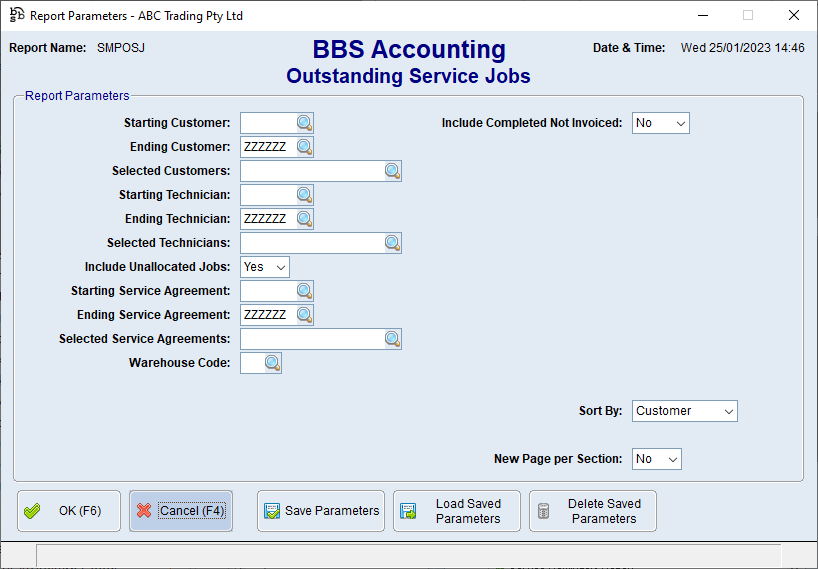
Outstanding Service Jobs Screen
Parameter Name |
Description |
Starting Customer Ending Customer Starting Technician Ending Technician Selected Technicians Include Unallocated Jobs Starting Service Agreement Ending Service Agreement Selected Service Agreements Warehouse Code |
Parameters to restrict the outstanding jobs you wish to see on the report. |
Include Completed Not Invoiced |
Yes - The report will include completed not invoiced service jobs. No - The report will NOT include completed not invoiced service jobs. Only - The report will only display completed not invoiced jobs. |
Sort By |
Customer - The report will sort and display by customer. Rep Code - The report will sort and display by rep code. Technician - The report will sort and display by technician. Equipment - The report will sort and display by equipment. Work Type - The report will sort and display by work type. Warehouse - The report will sort and display by warehouse. |
New Page per Section |
Yes - When printed the report will print on separate pages when sorted by any of the Sort By parameters. |
When the required parameters have been entered, the Outstanding Service Jobs report will be generated.
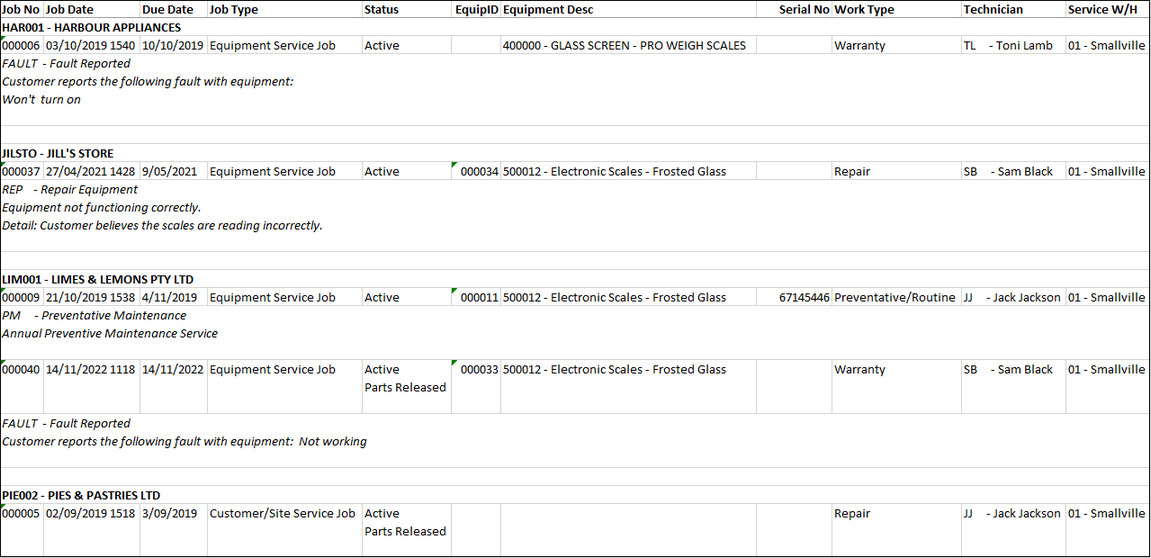
Example of Outstanding Service Jobs Report